Outlook Anywhere提示代理服务器的安全证书有问题错误
【问题描述】
=======================
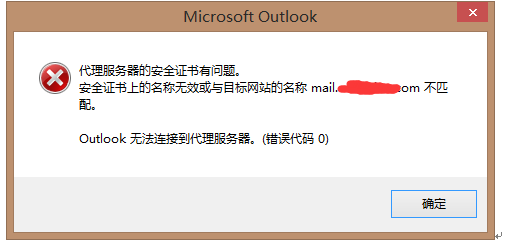
当Exchange 2007与Exchange 2013共存阶段,用户使用outlook的Outlook Anywhere的方式连接时,总是强出以下错误,点击后又可以登录:
【解决方法】
=======================
经过分析,问题应该出现在证书中没有包括exchange 2007服务器的地址,而Exchange 2007与Exchange 2013共存阶段,老用户还会尝试连接exchange 2007的公用文件夹,因为证书中没有包括exchange 2007服务器的地址,所以弹错。解决办法有二:
1. 重新颁发证书,试之包括exchange 2007服务器的地址
2. 尽快删除exchange 2007服务器上的公用文件夹或公用文件夹数据库。
3. 另外使用Get-OutlookProvider检查现在的
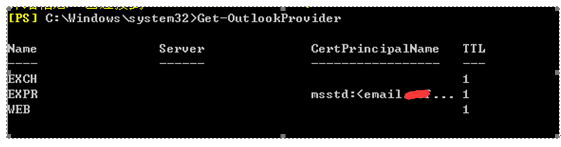
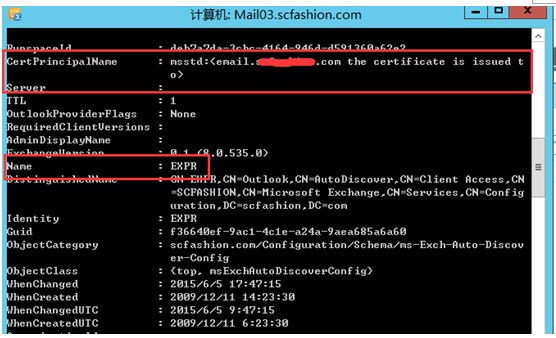
使用以下命令把这个设置为空:
Set-outlookprovider EXPR -CertPrincipalName $null
重启IIS服务
【参考信息】
=======================
http://bbs.winos.cn/viewthread.php?tid=135400&extra=&page=2
http://ilantz.com/2013/06/29/exchange-2013-outlook-anywhere-considerations/
http://blogs.technet.com/b/exchange/archive/2008/09/29/3406352.aspx
http://blogs.technet.com/b/exchange/archive/2008/09/29/3406352.aspx
历史评论
暂无保留的历史评论。
评论为旧站历史记录,本站不再接受新评论。